How to install Windows Store apps to an external storage?
Posted by

 KrishKT
–
KrishKT
–
KrishKT
–

Installing Windows Store apps to an external storage like USB, SD card, external hard disk!
Connect an external storage to your Win 10 PC.
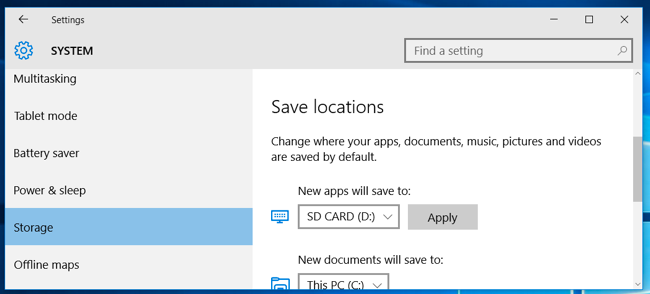
Now navaigate to Start > Settings > System > Storage
Click the drop-down menu under “New apps will save to” and select the external storage drive that need to be used.
Note: Requires at least Windows 10 November Update
Connect an external storage to your Win 10 PC.
Now navaigate to Start > Settings > System > Storage
Click the drop-down menu under “New apps will save to” and select the external storage drive that need to be used.
Note: Requires at least Windows 10 November Update

| Free forum by Nabble | Edit this page |