Know about the inbuilt calculator on MS Word!
Posted by

 KrishKT
–
KrishKT
–
KrishKT
–

If you need to figure out some arithmetic calculations, you don't want to bring up your computer's native calculator. You can easily add a calculator into MS Word.
>> Go to File --> Options --> Quick Access Toolbar --> All Commands (Choose commands from:)
>> Select Calculate Command and Add to the Customized Quick Access Toolbar --> OK
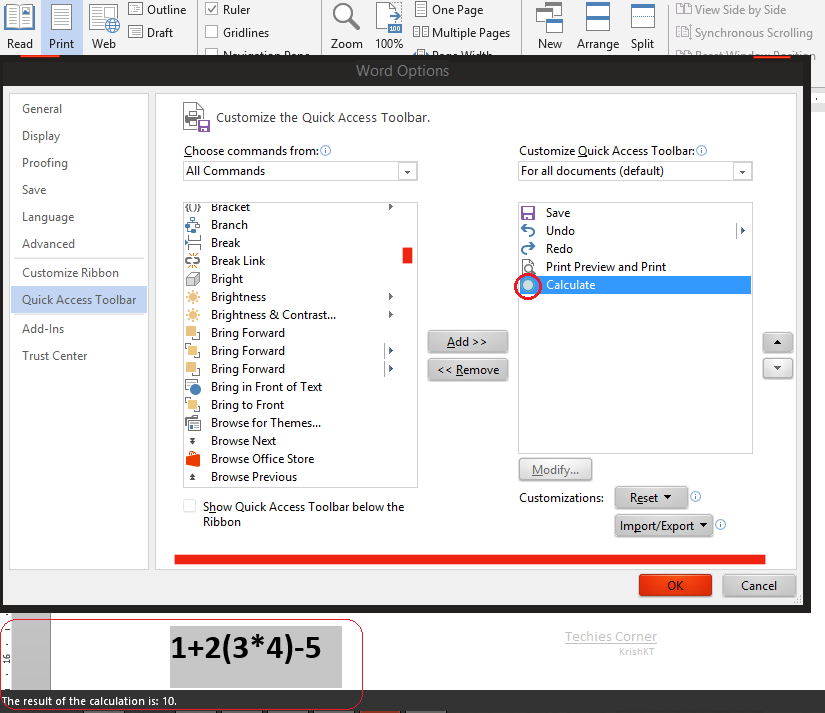
>> Now you can find a non-descript gray circle at the top of your Word window(on Quick Access Toolbar)
>> Highlight an equation in the document and click that circle, you will find an answer to your calculation at the bottom of your window(Status bar)
>> Go to File --> Options --> Quick Access Toolbar --> All Commands (Choose commands from:)
>> Select Calculate Command and Add to the Customized Quick Access Toolbar --> OK
>> Now you can find a non-descript gray circle at the top of your Word window(on Quick Access Toolbar)
>> Highlight an equation in the document and click that circle, you will find an answer to your calculation at the bottom of your window(Status bar)
ref.

| Free forum by Nabble | Edit this page |